
My Access Florida Login: The Complete Guide to Managing Your Benefits
Navigating government assistance portals can often feel overwhelming. For residents of the Sunshine State, the My Access Florida Login portal is the essential gateway to accessing critical benefits such as the Supplemental Nutrition Assistance Program (SNAP), Temporary Assistance for Needy Families (TANF), and Medicaid.
Whether you are a first-time applicant or a long-time beneficiary trying to renew your status, understanding how to use the AUTOMATED COMMUNITY CONNECTION TO ECONOMIC SELF SUFFICIENCY (ACCESS) system is vital. This comprehensive guide will walk you through everything you need to know about the My Access Florida Login process, troubleshooting technical issues, managing your account, and ensuring you receive the assistance you are entitled to.
What is MyACCESS Florida?
Before diving into the technicalities of the My Access Florida Login, it is important to understand what the platform actually does. Managed by the Florida Department of Children and Families (DCF), MyACCESS is the central online system that connects Florida residents with public assistance programs.
The platform is designed to streamline the process of applying for and managing economic assistance. Instead of waiting in long lines at local DCF offices, the portal allows users to:
-
Apply for food assistance (SNAP/Food Stamps).
-
Apply for cash assistance (TANF).
-
Apply for Medicaid medical assistance.
-
Check the status of an application.
-
Report changes in household circumstances (income, address, etc.).
-
View benefit history and current balances.
My Access Florida Login: Step-by-Step Instructions
Accessing your account should be a straightforward process, but strictly following the correct steps ensures security and efficiency. Below is the definitive guide to performing a successful My Access Florida Login.
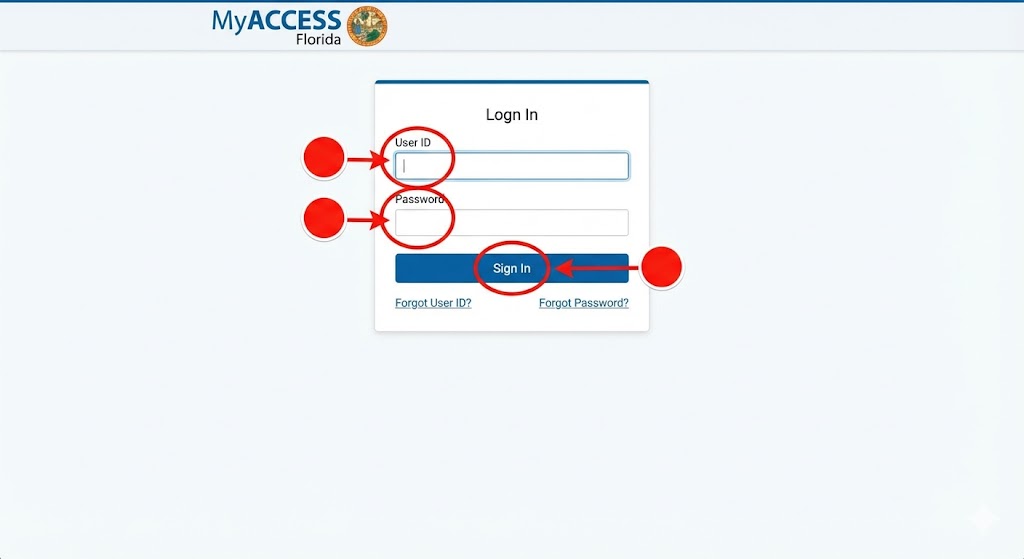
1. Requirements for Logging In
To access the portal, you will need a few prerequisites:
-
A stable internet connection.
-
A compatible web browser (Google Chrome, Mozilla Firefox, or Microsoft Edge are recommended).
-
Your registered User ID.
-
Your Password.
2. Accessing the Official Portal
-
Open your web browser and navigate to the official Florida DCF ACCESS page. It is crucial to ensure you are on the official government site (ending in
.govor the official.orgdesignated pages) to avoid phishing scams. -
Look for the section labeled “Returning Users” or “Login.”
3. Entering Your Credentials
Once you are on the My Access Florida Login page:
-
User ID Field: Enter the unique User ID you created during registration. This is not case-sensitive usually, but ensure there are no spaces.
-
Password Field: Enter your password. Note that passwords are strictly case-sensitive. “PassWord123” is different from “password123”.
-
Sign In: Click the “Sign In” button.
If your credentials are correct, you will be directed to your dashboard where you can view your case details, benefit status, and upcoming renewal dates.
How to Create a New MyACCESS Account
If you are new to the system, you cannot perform a My Access Florida Login until you have registered. Creating an account is free and takes about 10–15 minutes.
Step 1: Start the Application
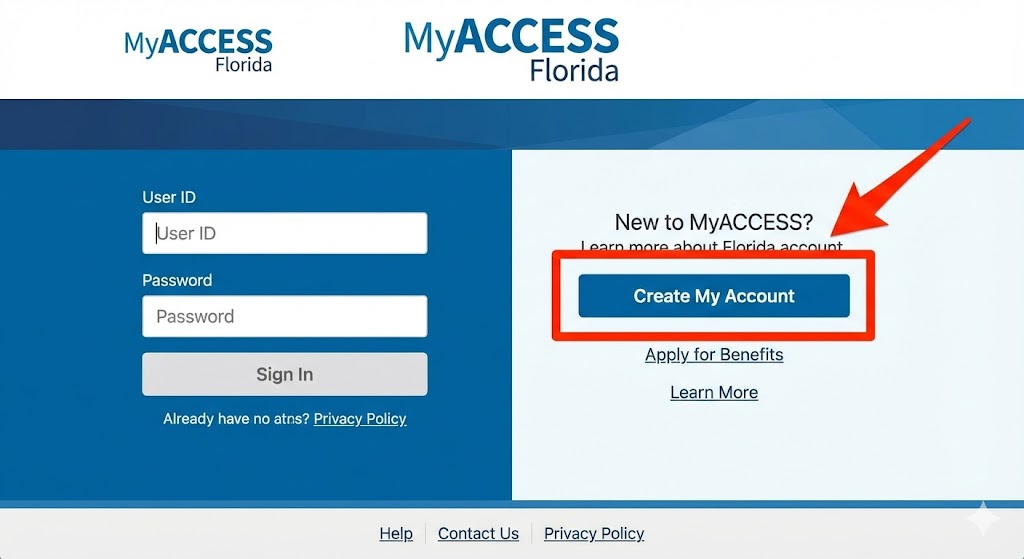
On the homepage, locate the button that says “Create My Account” or “Apply for Benefits.”
Step 2: Provide Personal Information
You will be required to enter personal details to verify your identity. Have the following ready:
-
Full legal name.
-
Date of Birth.
-
Email address (essential for account recovery).
-
Case Number (if you have applied by mail or in person previously).
-
Zip Code of your residence.
Step 3: Set Up Security Credentials
-
User ID: Choose a unique ID. Avoid using your full name or social security number for privacy.
-
Password: Create a strong password. It typically requires at least 8 characters, including a mix of letters, numbers, and special characters.
-
Security Questions: You will be asked to select and answer three security questions (e.g., “What was your first pet’s name?”). Remember these answers, as they are critical for password recovery later.
Step 4: Link Your Case
If you already receive benefits but are creating an online account for the first time, the system will ask if you have an existing case number. Linking this number connects your online profile to your existing DCF records.
Troubleshooting: Why Can’t I Log In?
It is a frustrating scenario: you need to check your EBT balance, but the My Access Florida Login page isn’t working. Here are the most common reasons for login failures and how to fix them.
1. Forgotten Password
This is the most common issue.
-
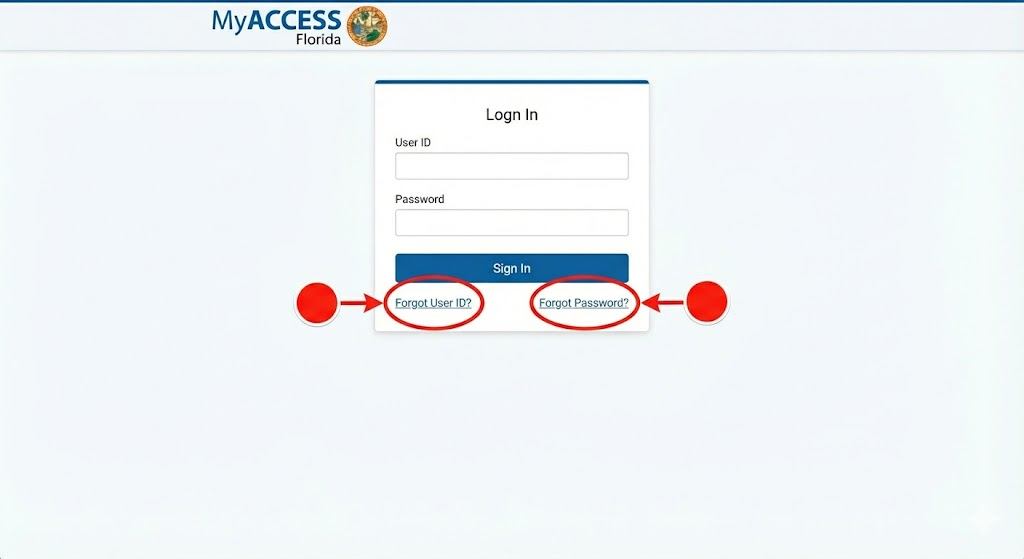
Click the “Forgot Password?” link located just below the login fields.
-
Enter your User ID.
-
Answer the security questions you set up during registration.
-
Once verified, you will be prompted to create a new password.
2. Forgotten User ID
If you cannot remember your username:
-
Click the “Forgot User ID?” link.
-
You will typically need to enter your First Name, Last Name, Date of Birth, and Case Number or Zip Code.
-
The system will display your User ID or email it to the address on file.
3. Account Locked
For security purposes, the My Access Florida Login system will lock your account after three unsuccessful login attempts.
-
Wait: The lock is usually temporary (often 30 to 60 minutes).
-
Reset: If it remains locked, you may need to reset your password to unlock it immediately.
4. Browser Compatibility Issues
Sometimes the website code does not load correctly on older browsers.
-
Clear Cache/Cookies: Go to your browser settings and clear your browsing data. This resolves 80% of loading errors.
-
Switch Browsers: If Safari isn’t working, try Google Chrome.
-
Disable Pop-up Blockers: Some features of the MyACCESS site require pop-ups to be enabled.
Understanding the Benefits: What Can You Apply For?
When you utilize the My Access Florida Login, you are gaining access to three primary pillars of assistance. Understanding the eligibility for these can save you time.
SNAP (Food Assistance Program)
Formerly known as Food Stamps, SNAP helps low-income individuals and families buy healthy food.
-
Eligibility: Based on household size, income, and expenses.
-
Usage: Funds are loaded onto an Electronic Benefits Transfer (EBT) card, which works like a debit card at grocery stores.
TANF (Temporary Cash Assistance)
This program provides cash assistance to families with children under age 18 (or under 19 if full-time students).
-
Goal: The program emphasizes work, self-sufficiency, and personal responsibility.
-
Requirements: Most applicants must adhere to work rules and time limits for receiving benefits.
Medicaid (Medical Assistance)
Medicaid provides medical coverage to low-income individuals and families.
-
Coverage: Doctor visits, hospital care, prescriptions, and more.
-
Eligibility: Florida has specific criteria involving age, disability status, and income level.
How to Apply for Benefits After Logging In
Once you have successfully mastered the My Access Florida Login, applying for benefits is the next step.
-
Dashboard Navigation: Click on “Apply for Benefits” on your main dashboard.
-
Select Programs: Check the boxes for the programs you wish to apply for (SNAP, TANF, or Medicaid). You can apply for all three simultaneously.
-
Complete the Interview: The application serves as an online interview. You will answer questions about:
-
Household members.
-
Income (jobs, child support, social security).
-
Assets (bank accounts, vehicles).
-
Expenses (rent/mortgage, utilities, childcare).
-
-
Upload Documents: The portal allows you to upload digital copies of required proof (pay stubs, ID, utility bills). Doing this online speeds up processing significantly compared to mailing them.
-
Submit and Sign: You will electronically sign the application.
Pro Tip: After submitting, write down your tracking number. You can use this number after your My Access Florida Login to track the status of your application.
Managing Your Account and Reporting Changes
Keeping your information current is a legal requirement for receiving benefits. Failure to report changes can result in a loss of benefits or a demand to repay funds (overpayment).
What Changes Must Be Reported?
-
Address Change: If you move, DCF needs to know immediately to send you important mail.
-
Income Changes: If you get a new job, lose a job, or your hours change.
-
Household Composition: If someone moves in or out of your home, or if you have a baby.
How to Report Changes Online
-
Perform your My Access Florida Login.
-
Look for the link labeled “Report My Changes” or “Change of Circumstance.”
-
Select the type of change and enter the new information.
-
Upload any verifying documents (e.g., new lease, termination letter).
MyACCESS Florida Mobile Usage
While there may not always be a dedicated “app” depending on the current updates from DCF, the My Access Florida Login page is mobile-responsive. This means you can access it via the browser on your smartphone (iPhone or Android).
Tips for Mobile Users:
-
Avoid using public Wi-Fi (like at a coffee shop) when entering sensitive data like Social Security Numbers.
-
Take clear photos of your documents with your phone camera to upload them directly to the portal.
-
Ensure your phone’s operating system is up to date for the best browser security.
Security Tips: Protecting Your Benefits
Benefit theft, particularly EBT skimming, is on the rise. Protecting your My Access Florida Login credentials is just as important as protecting your bank PIN.
-
Phishing Awareness: DCF will never email or text you asking for your password. If you receive a link asking you to “click here to unlock your benefits,” do not click it. Always type the URL manually.
-
Password Rotation: Change your portal password every 3–6 months.
-
EBT Card Safety: Change your EBT PIN frequently. If you suspect your card was skimmed, call the EBT customer service number immediately, not just the MyACCESS support.
Frequently Asked Questions (FAQ)
Here are the most common questions users ask regarding the My Access Florida Login and benefit management.
Q: How long does it take to get approved after I apply?
A: Generally, DCF has up to 30 days to process SNAP applications and up to 45 days for Medicaid. However, if you qualify for “expedited SNAP benefits” due to very low income/assets, you could receive benefits within 7 days.
Q: I forgot my security questions. How can I reset my password?
A: If you cannot answer your security questions, you cannot reset the password automatically. You must contact the MyACCESS Customer Call Center for assistance in resetting your account credentials manually.
Q: Can I use the same login for other Florida government sites?
A: Generally, no. The My Access Florida Login is specific to the DCF system. It is not connected to the FLHSMV (DMV) or SunPass systems.
Q: What should I do if the website is down?
A: The site undergoes maintenance, usually during late-night hours or weekends. If the site is down, wait a few hours and try again. If the deadline to renew your benefits is today and the site is down, document the outage and call the customer service center immediately the next business morning.
Q: How do I renew my benefits?
A: You do not need to re-apply from scratch. Log in to your account. If your renewal period is open, you will see a “Renew Benefits” link on your dashboard (“Your To-Do List”). Click that link to review and update your current information.
Contacting Florida DCF Customer Service
Sometimes, technical glitches prevent a successful My Access Florida Login regardless of your efforts. In these cases, human support is necessary.
-
Customer Call Center: 850-300-4323
-
Relay Service (TTY): 1-800-955-8771
-
Mailing Address: ACCESS Central Mail Center, P.O. Box 1770, Ocala, FL 34478-1770.
Note: Call wait times can be long. It is highly recommended to try all online troubleshooting steps in this guide before calling.
The My Access Florida Login portal is a powerful tool designed to put control of your social benefits back in your hands. While the technology can occasionally be frustrating, understanding the correct procedures for logging in, resetting passwords, and managing your case data ensures you never face a lapse in coverage.
By following this guide, you can navigate the system with confidence. Remember to keep your login credentials secure, report changes promptly, and utilize the online document upload features to expedite your applications. Your benefits are essential—ensure your access to them is always open.